
Integrating social media with WordPress site is more than just adding share buttons, it’s about creating a dynamic, engaging, and interactive online presence. Today, social media is a powerhouse for driving traffic, boosting engagement, and even improving your SEO. Let’s look into how you can seamlessly blend these platforms to elevate your WordPress site to new heights.
Social Media Integration with WordPress
Why Social Media Integration is Essential for Your Website
In the fast-paced digital world, connecting your website to social media networks is crucial for broadening your audience reach. Social media integration not only enhances user interaction but also plays a pivotal role in building your brand’s credibility. By Integrating social media with WordPress, you allow your audience to engage with your content more easily, share it across their networks, and even follow your brand directly from your site.
Benefits of Integrating Social Media with WordPress
Boosting User Engagement and Social Proof
When visitors see active social media engagement directly on your site, it builds trust and encourages them to participate. Social proof, such as the number of shares or followers, can significantly impact a visitor’s perception of your brand.
Enhancing SEO through Social Signals
Social signals such as likes, shares, and comments are increasingly being considered by search engines as indicators of content quality. When your content is shared widely on social media, it sends positive signals to search engines, potentially boosting your rankings.
Streamlining Content Sharing Across Platforms
Integrated social media tools make it easier for visitors to share your content, amplifying your reach. Automated sharing plugins also allow you to post directly from WordPress to your social channels, saving you time and effort.
Driving Traffic from Social Media Channels
By embedding social media feeds and sharing buttons, you can draw traffic directly from your social profiles to your website. This not only increases your website’s visibility but also brings in a more engaged audience who are already familiar with your brand.
Top WordPress Plugins for Social Media Integration
Social Media Sharing Plugins
Adding social sharing buttons to your posts and pages is a must. Plugins like Shared Counts or Social Warfare not only allow for easy sharing but also provide attractive and customisable buttons that match your website’s style.
Best Practices for Social Sharing Buttons
Place your sharing buttons where they’re most likely to be used—above or below content, or as a floating sidebar. Ensure they’re mobile-optimized so users on any device can easily share your content.
Social Media Feed Plugins
Display live social media feeds directly on your site with plugins like Smash Balloon Social Photo Feed for Instagram or Custom Twitter Feeds. These plugins help keep your content fresh and engaging by automatically pulling your latest social media posts.
Displaying Social Feeds on Your WordPress Site
Choose the best placement for your social media feeds, such as in the sidebar, footer, or even within your content. This ensures they complement your website without overwhelming it.
Social Login Plugins
Let users log in to your website using their social media accounts with plugins like Nextend Social Login. This simplifies the registration process, encouraging more sign-ups and reducing user friction.
Simplifying User Registration with Social Logins
Social logins can drastically improve user experience by eliminating the need for lengthy registration forms. Plus, users are more likely to remember their login details if they can use their existing social accounts.
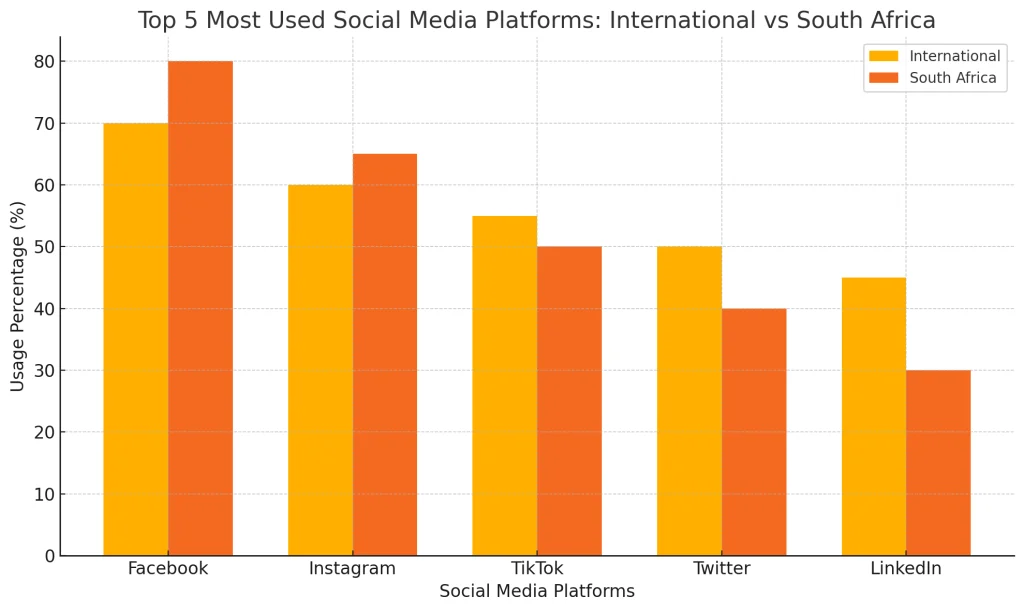
Top 5 Most Popular Social Media Platforms, Compared
Social media usage varies significantly across regions. Our graph illustrates the top 5 most popular social media platforms, comparing their usage in South Africa versus global trends. This comparison highlights the unique preferences in South Africa, where platforms like Facebook and Instagram dominate, reflecting local engagement patterns that differ from the international average.
How to Set Up Social Media Integration on Your WordPress Site
Step 1: Choose the Right Plugins
Start by identifying the social media platforms most relevant to your audience. Whether it’s Facebook, Twitter, Instagram, or LinkedIn, there’s a WordPress plugin available to meet your needs.
Step 2: Configure Plugin Settings
After installing your chosen plugins, configure the settings to ensure they’re optimized for performance and user experience. Pay attention to button placement, feed display options, and mobile responsiveness.
Step 3: Customize Social Media Buttons and Feeds
Match the style of your social media buttons and feeds to your website’s design. This creates a cohesive user experience that blends seamlessly with your brand.
Step 4: Test Your Integration
Before going live, test your social media integration to ensure everything works smoothly. Check sharing buttons, feed displays, and social logins on both desktop and mobile devices.
Did you find this article informative? Share it with your friends!
Optimizing Your Social Media Strategy for WordPress
Content Marketing and Distribution Strategies
Your social media integration should align with your content marketing strategy. Plan your posts around your social media campaigns to maximize engagement and reach. Use tools like Buffer or Hootsuite to schedule posts and analyse performance.
Increasing Social Engagement with Interactive Content
Interactive content like polls, quizzes, and live streams can boost social media engagement. Embed these directly into your WordPress site to encourage participation and shares.
Leveraging Social Media Analytics for Better Performance
Use analytics tools to track the performance of your social media campaigns. Plugins like MonsterInsights can help you monitor social media traffic, enabling you to fine-tune your strategy for better results.
Common Mistakes to Avoid When Integrating Social Media with WordPress
Overloading Your Site with Plugins
While plugins are incredibly useful, too many can slow down your site. Be selective and only use the ones that offer the most value to your social media strategy.
Neglecting Mobile Optimization
With more users accessing websites via mobile devices, ensuring that your social media integration is mobile-friendly is crucial. Test all elements to ensure they look and function well on smartphones and tablets.
Ignoring Social Media Analytics
Without tracking your social media efforts, you’re essentially flying blind. Regularly review analytics to understand what’s working and where you can improve.
Secure Your WordPress Website
Integrating social media into your WordPress site brings many benefits, but it’s vital to keep your site secure. Cyber threats are prevalent, and social media platforms are often targeted by hackers. Make sure to use strong passwords, enable two-factor authentication, and keep your plugins and themes updated. Consider adding a security plugin like Wordfence or SolidWP Security to provide an extra layer of protection. A secure site not only protects your data but also builds trust with your audience.

Secure your site. Protect your business.
- Custom user login security requirements
- Brute force protection
- Two-factor authentication and passkeys
- Patchstack Integration, includes virtual patching (Pro)
Recap
Elevate Your WordPress Site with Social Media Integration
Integrating social media with WordPress site is a powerful way to engage your audience, drive traffic, and boost your online presence. By carefully selecting the right plugins and optimizing your content for social sharing, you can create a dynamic website that resonates with your audience.
Don’t forget to secure your site as you expand your social media reach—after all, a strong foundation is key to sustained success.
Frequently Asked Questions
We are always happy to help, if you can’t find the information you are looking for please don’t hesitate to reach out to us!
The best platforms depend on your target audience. Facebook, Instagram, and Twitter are widely used, but LinkedIn and TikTok can be powerful depending on your niche.
You can use plugins like Social Warfare or AddToAny to easily add customizable social media buttons to your site.
Yes, plugins like Jetpack and Revive Old Posts allow you to auto-post new and old content to your social media accounts.
Plugins like Smash Balloon allow you to embed Instagram, Twitter, or other social media feeds directly onto your WordPress site.
Integrating third-party platforms can introduce vulnerabilities. Securing your website with plugins like Wordfence ensures your site remains protected.
Yes, but be cautious as too many plugins can slow down your site. It’s best to choose one that covers all your needs.
Did you find this article informative? Share it with your friends!
