
Introduction
Discover the future of secure logins. Ever wondered what happens when you type in a web address and end up on a completely different site? That’s domain redirecting in action. It’s a neat trick that can help website owners manage their traffic more effectively. In this beginner’s guide, we’ll explore everything you need to know about domain redirecting, from the basics to the best practices.
Types of Domain Redirects
301 Redirect (Permanent)
A 301 redirect is like forwarding your postal mail permanently. It tells search engines and browsers that a page has moved to a new location for good. This is the most SEO-friendly redirect because it transfers almost all of the original page’s SEO value to the new page.
302 Redirect (Temporary)
Think of a 302 redirect as a temporary forwarding address. It indicates that a page has moved, but only temporarily. While this type doesn’t pass SEO value like a 301 redirect, it’s useful for short-term changes.
Meta Refresh Redirect
Meta refresh redirects are less common and are implemented at the page level rather than the server level. They often come with a delay and a message like “If you are not redirected in 5 seconds, click here.” These are not ideal for SEO.
When and Why to Use Domain Redirecting
There are several scenarios where domain redirecting is incredibly useful. If you’re changing your domain name due to rebranding, a 301 redirect from the old domain to the new one ensures that visitors and search engines can still find you, preserving your traffic and SEO value. Similarly, when merging multiple websites into one, redirects help retain the traffic and SEO value from the old sites.
Correcting common typos is another situation where redirects prove their worth. If you have a domain name that’s often misspelled, redirecting those typos to the correct domain can capture traffic that would otherwise be lost. Moving to HTTPS is crucial for security, and setting up a 301 redirect from HTTP to HTTPS ensures visitors and search engines get the secure version of your site. Geotargeting allows you to direct users to country-specific domains based on their location, enhancing user experience and relevance.
How to Set Up a Domain Redirect
Setting up a domain redirect can be done in various ways depending on your server setup and preferences. For those using Apache servers, the .htaccess file is a powerful tool for setting up redirects. Here’s a simple 301 redirect:
Redirect 301 /oldpage.html http://www.yourdomain.com/newpage.html
If you’re using cPanel, it provides a user-friendly interface for setting up redirects. Simply log in, navigate to the “Redirects” section, and follow the prompts. For WordPress users, plugins like Redirection can manage redirects easily without the need for manual coding. If you need to set up domain-level redirects, adjusting your DNS settings to include a CNAME or A record pointing to the new domain might be necessary.
Using Rank Math’s Built-In Redirect Manager
Install & Activate Rank Math
a. Download Rank Math
b. Follow Rank Math’s Setup Guide
c. And that’s it! Keep reading…
Note: Bulk redirections are possible in the free version of Rank Math, but if you’re interested in learning why the best SEOs on the planet choose Rank Math PRO & Business to get a competitive edge, see how our plans compare here.
Enable the Redirections Module
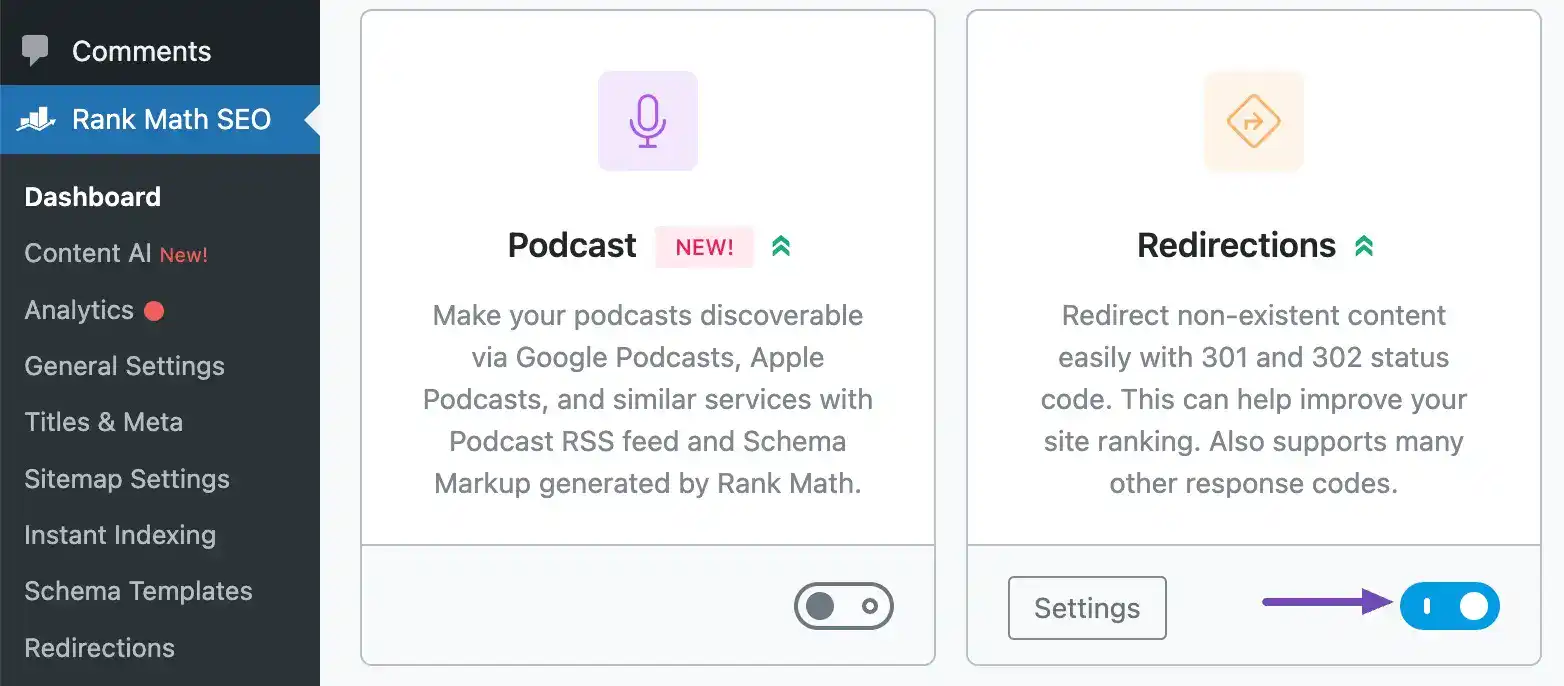
Head on over to Rank Math SEO→ Dashboard in your WordPress admin area in order to confirm that the Redirections module is enabled.
Add a Single Redirect
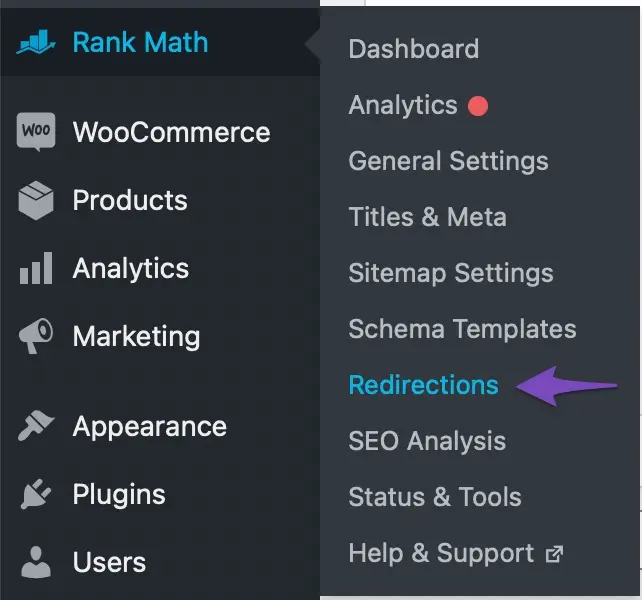
Navigate to Rank Math → Redirections in your WordPress admin dashboard
Create a 301 Redirect
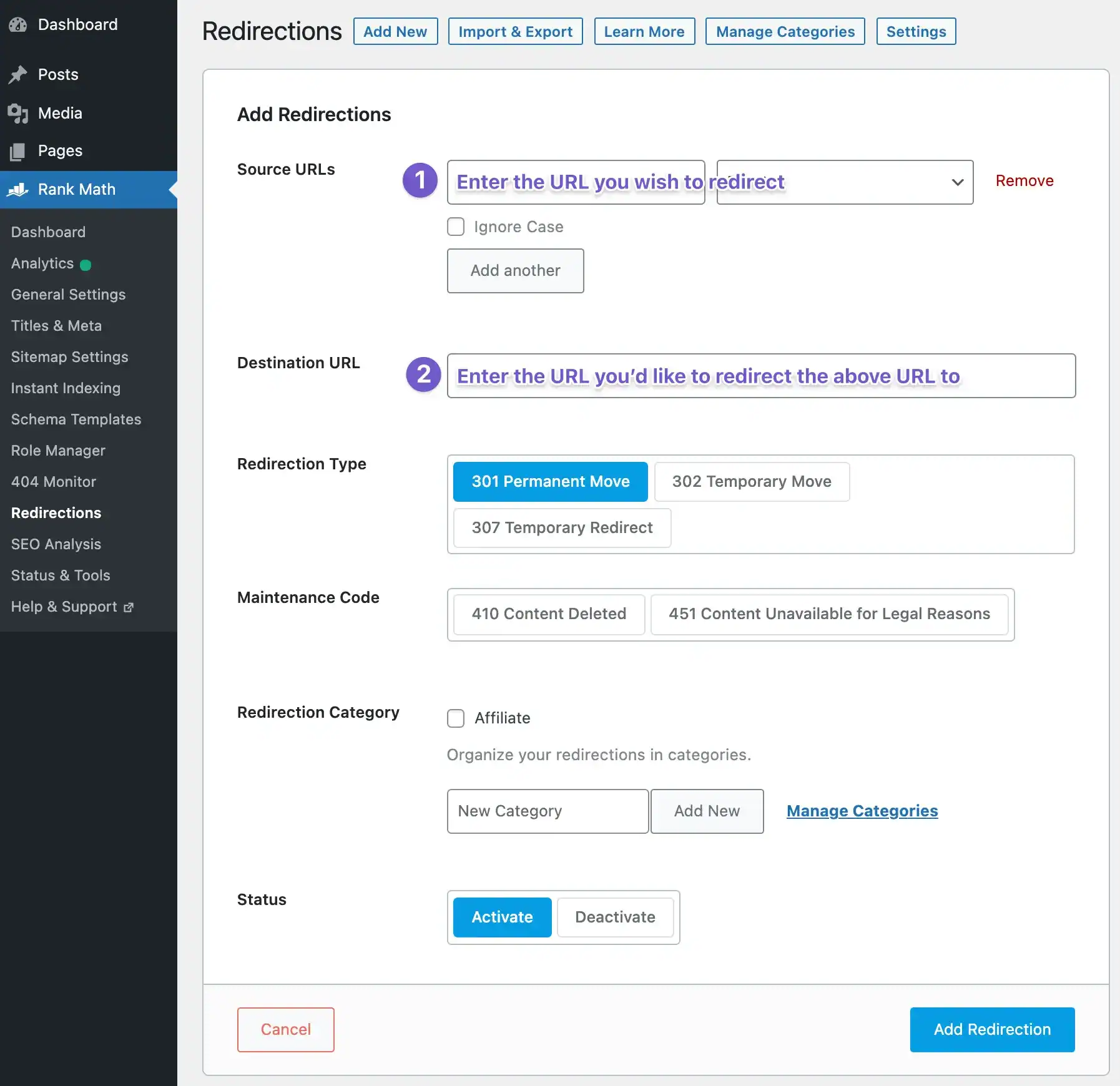
a. Go ahead and create a 301 redirect by simply entering the URL you wish to redirect as your Source URL and the location of the new resource (i.e. where you’d like to redirect the source URL to) as the Destination URL.
b. And once ready to activate, simply click “Add Redirection”.
What Rank Math can do for you?
Unlock your website’s true potential with Rank Math—the ultimate SEO powerhouse! Whether you’re a blogger, entrepreneur, or seasoned webmaster, Rank Math streamlines SEO like never before. Optimize content effortlessly, outrank competitors with advanced analytics, and drive unstoppable traffic to your site. With user-friendly features and powerful tools, Rank Math turns SEO into a breeze, even for beginners. Don’t let your website settle for less—take control and dominate search rankings today!
Install Rank Math now and see the difference for yourself!
Best Practices and Common Mistakes
Choosing the right type of redirect is crucial. Permanent changes should use 301 redirects, while temporary changes can use 302 or 307 redirects. Avoid redirect chains, which occur when a URL redirects to another URL that also redirects. This can slow down page load times and dilute SEO value. Always aim to redirect directly to the final URL.
Regularly checking redirects is a good practice to ensure they are still necessary and working correctly. Tools like Google Search Console can help with this. Another common mistake is not updating internal links after setting up redirects, which can lead to unnecessary redirect chains. Additionally, failing to inform search engines about significant URL changes can impact your SEO negatively.
Tools for Managing Domain Redirects
Managing domain redirects effectively requires the right tools. Google Search Console is invaluable for monitoring your site’s performance and managing URL changes. Screaming Frog SEO Spider is another excellent tool that can crawl your site and identify issues with redirects, ensuring they are set up correctly. The Redirect Path browser extension helps check and debug redirects directly from your browser.
Case Studies: Successful Domain Redirecting
To illustrate the importance and effectiveness of domain redirecting, let’s look at a couple of case studies. In the first example, a company rebranded from oldbrand.com to newbrand.com. By using 301 redirects, they transferred SEO value and traffic seamlessly, ensuring their audience could still find them. In the second example, an entrepreneur consolidated three niche sites into one authority site. Redirecting the old domains helped retain traffic and SEO value, resulting in a more substantial, unified presence.
Final Thoughts
Domain redirecting is a crucial tool for managing web traffic, maintaining SEO value, and ensuring a seamless user experience. By understanding the types of redirects and following best practices, you can effectively manage changes to your web presence without losing traffic or confusing your audience.
Frequently Asked Questions
We are always happy to help, if you can’t find the information you are looking for please don’t hesitate to reach out to us!
Yes, if done correctly, redirects should not significantly affect your website’s performance. Avoid redirect chains and regularly check your redirects.
Tools like Google Search Console, Screaming Frog SEO Spider, and the Redirect Path browser extension can help you check and ensure your redirects are working correctly.
A 301 redirect is permanent and passes most of the SEO value to the new URL, while a 302 redirect is temporary and does not pass SEO value.
Hi there! A domain name is like a street address for a website. Just like your house has an address that helps people find where you live, a website has a domain name that helps people find it on the internet.
A domain name is made up of two parts: the name of the website (like Google, Facebook, or YouTube) and the ending (like .com, .org, or .net). When you type a domain name into a web browser, it takes you to that website’s page on the internet.
So, just like your home has an address, websites have domain names that make it easy for people to find and visit them on the internet.
If your domain name expires, it goes into a grace period during which you can renew it. If you don’t renew it within this period, the domain will eventually be released back into the pool of available domains and could be registered by someone else.
Did you find this article informative? Share it with your friends!
