

Headless WordPress Website
New to web development? Curious about headless WordPress websites? Welcome to a world of limitless possibilities for your online presence. In this guide, we’ll unravel the mysteries of headless WordPress websites, showing you how to achieve lightning-fast speed, top-notch SEO, and an exceptional user experience. Let’s embark on this exciting journey!
What is Headless WordPress?
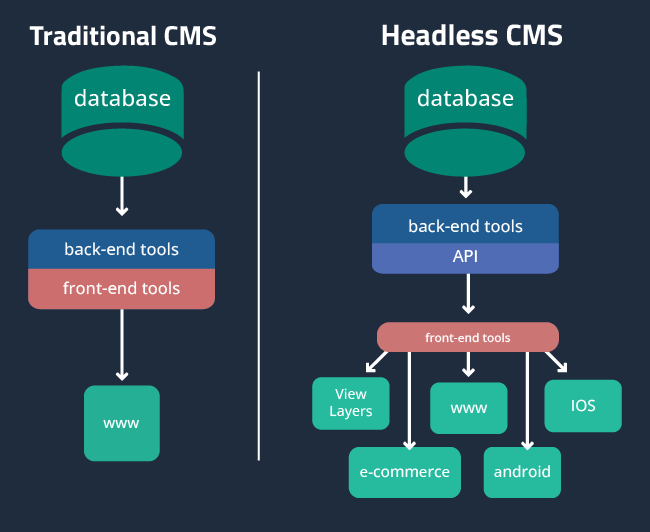
To understand what a headless WordPress website is, let’s break it down into several parts. Traditionally, when you build a website with WordPress, you’re essentially using a combined system where the backend (where you manage content) and the frontend (the visible part of your website) are closely linked. In other words, they have the same head, so changes in one affect the other. This integration simplifies many aspects of site management, but it also has limitations.
Let’s now look at the concept of “headless” WordPress. In a headless configuration, these two components are separate or “headless”. This means that the WordPress backend is completely separate from the frontend. You can think of it as a two-headed beast, where the headless WordPress backend processes the content while the frontend, often integrated with another technology like React, Angular or Vue.js, displays that content.
How Headless WordPress Works
Let’s explore how this decoupling works in practice. When you use a headless WordPress setup, the backend remains your content management system (CMS). You continue to create, edit, and organize your content using the familiar WordPress interface. However, when you publish or update content, it isn’t immediately visible on your website.
Instead, the frontend, built with a JavaScript framework, communicates with the WordPress backend through an API (Application Programming Interface). This API serves as a bridge between the two, allowing the frontend to request and display content from the backend.
The key benefit of this architecture is flexibility. You can design your website’s frontend any way you want, and you’re not limited by the themes or templates that traditional WordPress websites use. This flexibility opens up new possibilities for design, interactivity, and user experience.
The Pros of Headless WordPress
Now that we have a clear understanding of what headless WordPress is and how it works, let’s delve into the advantages of this approach.
- Flexibility and Customization
Headless WordPress empowers you to create highly customized frontends. You’re no longer confined to WordPress themes, and you have the freedom to design a unique user experience. - Performance
With the decoupled architecture, your website’s frontend can be optimized for speed and performance. This can lead to faster load times and a more responsive user interface. - Scalability
Headless websites are inherently more scalable. You can scale the frontend and backend independently to handle traffic spikes or growing content needs. - Enhanced Security
Separating the frontend from the backend can improve security. You can implement stricter controls and security measures on each component. - Improved User Experience
The flexibility of a headless WordPress setup allows you to create dynamic and interactive user interfaces, resulting in an improved user experience.
The Cons of Headless WordPress
While headless WordPress offers numerous advantages, it’s not without its drawbacks. Let’s explore some of the challenges associated with this approach.
- Increased Development Complexity
Building a headless WordPress website requires a solid understanding of both WordPress and the frontend technology you choose. It can be more challenging to set up and maintain. - Higher Development Costs
The increased complexity also translates into higher development costs. You may need more experienced developers, and the project might take longer to complete. - Content Preview Challenges
Since content changes on the backend don’t immediately reflect on the frontend, previewing content can be more complicated. You’ll need to set up preview systems to ensure accuracy. - Limited Out-of-the-Box Features
Traditional WordPress comes with many out-of-the-box features and themes. In a headless setup, you’ll need to develop these features yourself. - SEO and Discoverability
Headless WordPress can potentially complicate SEO efforts, and you’ll need to be diligent in setting up SEO features for your frontend.



Is Headless WordPress Right for You?
The decision to go headless must be based on your specific needs and goals. Consider the following factors to determine if a headless WordPress website is the right choice for your project.
Is Converting an Existing Site to Headless WordPress Simple?
Converting an existing WordPress site to a headless architecture isn’t a straightforward process. It involves significant changes and can be quite complex. Here are the steps to consider when making the switch.
- Content Migration
First, you need to migrate your existing content to the new headless WordPress backend. This process can be time-consuming, depending on the volume of content. - Frontend Development
Decide on the frontend technology you want to use, and then build or adapt your frontend to work with the headless WordPress backend. - API Integration
Ensure your new frontend can effectively communicate with the WordPress backend via APIs. This step is crucial for real-time content updates. - Testing and Quality Assurance
Rigorous testing is essential to ensure everything works as expected. Test the frontend, backend, and content management thoroughly. - SEO Considerations
Don’t forget about SEO. Set up proper redirects, metadata, and other SEO elements for your new headless site. - Performance Optimization
Optimize your website for performance to ensure a smooth user experience. - Training and Documentation
Train your team on the new setup and create documentation for ongoing maintenance.
Let’s recap
A headless WordPress website is a powerful approach that offers flexibility, performance, and scalability, but it comes with complexities and challenges. Before making the leap to headless, carefully consider your project’s requirements, your expertise, and your budget. If done right, a headless WordPress website can unlock new possibilities for your online presence, providing a seamless user experience and future-proofing your site in the ever-evolving digital domain.
Steps in Converting to Headless
Making the transition from a traditional WordPress site to a headless architecture is a significant endeavour that requires careful planning and execution. In this section, we’ll outline the essential steps involved in converting to a headless WordPress website.
- Content Migration
The first and crucial step in the conversion process is to migrate your existing content from the traditional WordPress setup to the new headless WordPress backend. This involves transferring pages, posts, media, and any other content elements to the decoupled system. Depending on the volume of content, this can be a time-consuming task, so having a solid plan is essential. - Frontend Development
Choose the frontend technology that best suits your project’s needs. Whether you opt for React, Angular, Vue.js, or another framework, your frontend development team needs to design and build the user interface that will interact with the headless WordPress backend. Customizing the frontend to meet your design and functionality requirements is a significant advantage of the headless approach. - API Integration
To ensure seamless communication between your newly developed frontend and the WordPress backend, it’s crucial to set up API integration. APIs act as the bridge connecting the frontend and backend, allowing them to interact effectively. Properly configure and test these APIs to enable real-time content updates and synchronization. - Testing and Quality Assurance
Rigorous testing is essential to verify that all components of your headless WordPress website are functioning as intended. This includes thorough testing of the frontend, backend, and content management system. Identify and address any bugs, glitches, or inconsistencies in the user experience. Comprehensive testing ensures a smooth and reliable website. - SEO Considerations
As with any website migration, SEO considerations are paramount. Set up proper redirects, manage metadata, and address any SEO elements affected by the transition. Ensure that search engines can index and rank your new headless website effectively. Failure to manage SEO properly can lead to a decline in search engine visibility. - Performance Optimization
Performance optimization is critical for delivering a smooth and fast user experience. Implement best practices for frontend and backend performance, including image optimization, server-side caching, and other techniques to reduce load times. A headless architecture provides opportunities to fine-tune performance for your specific needs. - Training and Documentation
Once your headless WordPress website is up and running, it’s essential to provide training to your team. Ensure that your developers, content creators, and administrators are well-versed in managing the new system. Create comprehensive documentation that outlines the procedures for content management, website maintenance, and issue resolution. This documentation will be valuable for ongoing maintenance and future updates.
Converting to a headless WordPress architecture can be a complex process, but by following these steps and paying attention to the details, you can successfully transition your website to a more flexible, scalable, and customizable platform. Proper planning and execution are key to unlocking the benefits of a headless WordPress website and ensuring a seamless user experience.
Compare Our Affordable Design Packages
Our design packages are priced to meet any budget.
Our Business and e-commerce website design packages includes a premium theme and plugins!
Starter Design
R5000
R350 PER ADDITIONAL PAGES
Want to add additional function to this package? Click here for a list functionalities available
Business Design
R9000
R350 PER ADDITIONAL PAGES
E-Commerce Design
R12500
R350 PER ADDITIONAL PAGES
Frequently Asked Questions
We are always happy to help, if you can’t find the information you are looking for please don’t hesitate to reach out to us!
A traditional WordPress website combines both content management (backend) and the user interface (frontend) in a single system. In contrast, a headless WordPress website decouples the backend and frontend, allowing for greater flexibility and customization in design and technology for the user interface.
WordPress is a popular choice for headless setups due to its robust content management features. It allows you to create and manage content seamlessly, making it a suitable CMS for headless projects.
Challenges can include the complexity of managing two separate systems (backend and frontend), potential compatibility issues between CMS and frontend technologies, and the need for technical expertise in both areas. Proper planning and developer expertise are essential to overcome these challenges.
WordPress itself is open source and free to use, but building a headless WordPress site may involve costs. You’ll need to consider expenses like hosting, development, and any premium plugins or themes you choose to use.
Did you find this article informative? Share it with your friends!
