Making a website from scratch, 1 step at a time!

Updated on October 5, 2025 – 23 min read

  • Web Hosting
  • WordPress Hosting
  • Domain Registration
  • Website Design
  • Website Maintenance
  • Free SSL Certificates
Making a website from scratch, 1 step at a time!

How to make a website from scratch, 1 step at a time!

Having an online presence can be beneficial for individuals or businesses, as it can expand their audience and provide a platform for sharing opinions and skills. Clients often ask us about “how to make a website from scratch, especially if you don’t have any or little website design knowledge.
This article aims to guide readers in creating a website by selecting an appropriate platform, obtaining a web hosting plan, and choosing a memorable domain name using a web domain checker tool. Additionally, the article offers tips on optimising the website. WordPress content management system and SitePad website builder are two beginner-friendly platforms that will be used as an example for creating a high-quality website without requiring any coding knowledge. The article will also provide guidance on post-publishing procedures and answer common questions. Ultimately, this article will equip readers with the necessary knowledge to create their website from scratch.

1 step at a time,make a website

Things to Consider Before Creating a New Website!

Before you make a website, there are several important things you should do to ensure that you have a clear vision for your website and that you are well prepared to start building it. Here are some key things to consider:

Defining the purpose of your website:

Defining the purpose of your website is a crucial step in creating a successful online presence. Here are some steps to help you define the purpose of your website:

  • Identify your goals:
    What do you want to achieve with your website? Are you trying to sell a product or service, share information, or connect with others? Understanding your goals can help you create a website that aligns with your objectives.
  • Identify your target audience:
    Whom are you trying to reach with your website? What are their needs and interests? Understanding your target audience can help you create content that resonates with them and provides value.
  • Determine your unique value proposition:
    What sets your website apart from others in your industry or niche? What makes your website unique? Understanding your unique value proposition can help you differentiate yourself and attract more visitors.
  • Define your brand voice and style:
    What tone and style do you want to convey through your website? Do you want to be formal or informal, authoritative or friendly? Defining your brand voice and style can help you create a consistent and cohesive online presence.
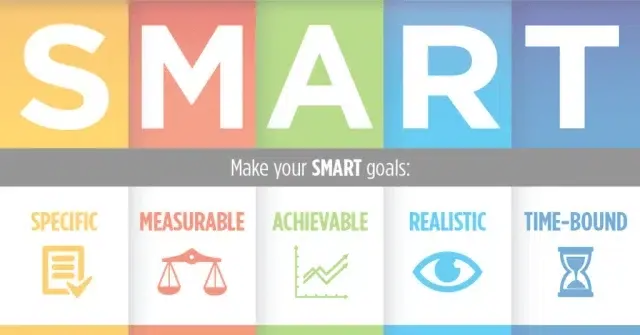
  • Set measurable goals:
    How will you measure the success of your website? Do you want to increase website traffic, generate leads, or boost sales? Setting measurable goals can help you track your progress and make adjustments as needed.

By following these steps, you can define the purpose of your website and create a clear roadmap for achieving your goals. Remember to revisit your goals and objectives regularly to ensure that your website is aligned with your evolving needs and priorities.
Conduct market research:

Conducting market research is essential to creating a successful website. Here are some steps you can follow to conduct market research for your new website:

  • Define your target audience:
    Determine who your website is aimed at and what their needs and interests are. Use demographics such as age, gender, location, and interests to create buyer personas for your target audience.
  • Identify your competition:
    Find out who your competitors are and what they are offering. Study their website design, features, and pricing to determine what makes your website unique and how you can stand out from the crowd.
  • Analyse keywords:
    Use tools such as Google Keyword Planner to identify relevant keywords and phrases that your target audience may use to search for your products or services. Use these keywords to optimise your website content and improve your search engine rankings.
  • Conduct surveys and focus groups:
    Conduct surveys and focus groups to gather feedback from your target audience on their needs, preferences, and pain points. Use this information to refine your website design, features, and content.
  • Analyse social media trends:
    Monitor social media channels to identify trends and conversations relevant to your target audience. Use this information to create content and promotions that resonate with your audience and generate engagement.
  • Use analytics tools:
    Use analytics tools such as Google Analytics to track website traffic, user behaviour, and engagement. Use this information to measure the success of your website and make adjustments as needed.

Following these steps, you can conduct market research for your new website and create a website that meets the needs and preferences of your target audience. Remember to revisit your market research regularly to ensure that your website stays up to date with changing trends and preferences.

Market Research Infographic

Plan your website structure:

Planning your website structure is an important step in creating a website that is organised, easy to navigate, and user-friendly. Here are some steps to help you plan your website structure:

  • Identify your main categories:
    Start by identifying the main categories or sections of your website. For example, if you have an e-commerce website, your main categories might include “Products,” “Services,” and “About Us.”
  • Create a hierarchy:
    Once you have identified your main categories, create a hierarchy by arranging them in order of importance. This will help you prioritise your content and ensure that your website is easy to navigate.
  • Use a sitemap:
    A sitemap is a visual representation of your website’s structure. Use a sitemap tool to create a clear and organised representation of your website’s hierarchy.
  • Determine your navigation menu:
    Your navigation menu should reflect the hierarchy and organization of your website. Use clear and concise labels for each category, and consider using drop-down menus for subcategories.
  • Consider user experience:
    Your website structure should be designed with the user in mind. Consider how users will navigate your website, and make sure that your website is easy to use and understand.
  • Test and refine:
    Once you have planned your website structure, test it out with users to ensure that it is easy to navigate and understand. Use their feedback to refine and improve your website structure.

Remember to keep your website structure up-to-date as your content and business needs evolve.

Decide on your website platform:

Choose a website platform that is suitable for the website’s purpose and your technical ability.
There are two main platform options to choose from when you make a website: using a content management system (CMS) or a website builder. Both options have their own set of advantages and disadvantages, so it’s important to understand them before deciding.

Content Management System (CMS)

A CMS is a software application that allows you to create, manage, and publish digital content on your website, 1 Step at a time! Some popular CMS platforms include WordPress, Joomla, and Drupal.


CMS Pros:

  • More flexibility in terms of design and functionality
  • Customizable templates available
  • More control over the website’s content and structure
  • Better for creating large, complex websites with multiple pages and features
  • Often more suitable for e-commerce websites

CMS Cons:

  • Steeper learning curve and more technical knowledge required
  • More time-consuming to set up and customise
  • Requires ongoing maintenance and updates for security and performance

Website Builder

A website builder is a platform that allows you to create a website without the need for coding or technical knowledge. Astrihost web hosting packages come with SitePad Website Builder.

SitePad Pros:

  • Easy to use and set up, with drag-and-drop functionality
  • No coding or technical knowledge is required
  • Comes with pre-designed templates and themes
  • Often includes hosting and maintenance in one package
  • Quicker to launch and update

SitePad Cons:

  • Limited customization options, particularly in terms of design and functionality
  • Templates may not be unique or customizable enough
  • Less control over the website’s content and structure
  • Limited scalability and flexibility for larger, more complex websites

Ultimately, the choice between a CMS and a website builder depends on your specific needs and goals for your website. If you want more control over the design and functionality of your website and have some technical knowledge, a CMS may be the better choice. However, if you want a quick and easy way to create a simple website without any technical knowledge, a website builder may be the better option.


How to create a website with SitePad Builder.

In this tutorial, you’ll learn how to build a website using SitePad Website Builder, 1Step At A Time!

Choose a domain name

Your domain name is the address of your website, so choose a memorable and relevant one. Consider using keywords that relate to your website’s purpose and industry. Here are some tips for selecting a domain name.

  • Keep it simple and memorable:
    Choose a domain name that is easy to spell and remember. Avoid using complicated words or phrases that are difficult to spell or remember.
  • Make it relevant to your business:
    Your domain name should reflect your business or brand. Consider using keywords that describe your products, services, or industry.
  • Use a domain extension that makes sense:
    The domain extension is the section of the domain name that comes after the dot (e.g., .com, .org, .net). Choose an extension that is appropriate for your website’s purpose and audience.
  • Avoid trademark issues:
    Make sure that your domain name does not infringe on any trademarks or copyrights. Do a search to ensure that your chosen domain name is available and not already registered by someone else.
  • Keep it short:
    Shorter domain names are generally easier to remember and type. Aim for a domain name that is no longer than 15-20 characters.
  • Consider branding:
    Your domain name can be an important part of your branding strategy. Choose a domain name that aligns with your brand identity and is consistent with your overall branding.
  • Test it:
    Before finalising your domain name, test it out with friends, family, or colleagues to see if it is memorable and easy to remember. Once you are happy with your choice, get the domain name registration underway.

Remember, your domain name is a key part of your online presence and can impact your website’s success. Take your time choosing a good domain name that is memorable, relevant, and aligned with your business.

Get Started! Search for your perfect domain name

.co.za
.africa
.capetown
.org.za
.joburg
.com

Select a web hosting provider

Choose a web hosting provider that offers reliable service, security, and the features you need for your website. Look for a provider that offers 24/7 support and backup services.

When selecting a hosting plan, there are several factors to consider to ensure that you choose the right plan for your website’s needs. Here are some things to look for when selecting a hosting plan:

  • Type of hosting:
    There are several types of hosting available, including shared hosting, virtual private server (VPS) hosting, dedicated hosting, and cloud hosting. Each type of hosting offers different levels of resources and control, so consider which option best fits your website’s needs.
  • Reliability and uptime:
    Look for a hosting provider that offers a reliable uptime guarantee, with minimal downtime or maintenance periods. Ideally, look for a provider with an uptime guarantee of 99.9% or higher.
  • Security:
    A good hosting provider should offer robust security features, such as SSL certificates, firewalls, and malware detection and removal tools. Look for a provider that takes security seriously and has a strong track record of protecting customer data.
  • Speed and performance:
    The speed and performance of your website can impact user experience and search engine rankings. Look for a hosting provider with fast servers, SSD storage, and content delivery network (CDN) options.
  • Scalability:
    As your website grows and traffic increases, you may need to upgrade your hosting plan to accommodate more visitors and resources. Look for a hosting provider that offers flexible scaling options and can accommodate your website’s growth.
  • Customer support:
    A good hosting provider should offer 24/7 customer support, with multiple contact channels and knowledgeable staff. Look for a provider with a good reputation for customer service and technical support.

Some common features that you can expect from a hosting plan include:

  • Disk space:
    The amount of storage space available for your website’s files and data
  • Bandwidth:
    The amount of data that can be transferred between your website and its visitors
  • Email accounts:
    The number of email accounts you can create using your domain name
  • Database support:
    The ability to create and manage databases for your website
  • Control panel:
    A graphical interface for managing your hosting account and website
  • Backups:
    Regular backups of your website’s data and files, for disaster recovery purposes

Choosing the right hosting plan is an important decision that can impact the performance and success of your website. Consider your website’s needs and budget and take the time to research and compare hosting providers before making a decision.

Develop a content strategy:

Determine what content you want to include on your website, such as text, images, videos, and infographics. Plan how you will create and publish content, and consider how it will be optimised for search engines.

Develop a content strategy

Developing a content strategy is crucial to the success of your website or online presence. Here are some key factors to consider when developing a content strategy:

  • Define your target audience:
    Consider who your target audience is and what they are looking for. This will help you create content that resonates with your audience and meets their needs.
  • Set your goals:
    Determine what you want to achieve with your content. Are you looking to increase website traffic, generate leads, or establish thought leadership? Your goals will guide the type of content you create and the topics you cover.
  • Conduct keyword research:
    Identify the keywords and topics that your audience is searching for and create content that addresses those topics. Use keyword research tools to find relevant keywords and search volume data.
  • Determine content types and formats:
    Consider the types of content that your audience is most interested in and the formats that work best for your business. This could include blog posts, videos, infographics, e-books, and more.
  • Create a content calendar:
    Plan out your content in advance, including topics, formats, and publishing dates. This will help ensure that you have a consistent flow of content and can meet your publishing goals.
  • Define your brand voice and tone:
    Establish a consistent brand voice and tone for your content and ensure that it aligns with your overall brand identity and messaging.
  • Consider SEO:
    Incorporate search engine optimization (SEO) strategies into your content, including keyword optimization, internal linking, and meta descriptions. This will help improve your website’s visibility in search engine results pages (SERPs).
  • Measure and analyse:
    Monitor the performance of your content and adjust your strategy as needed. Use analytics tools to track metrics such as website traffic, engagement, and conversions.

Develop a content strategy that meets the needs of your audience, supports your business goals, and drives results for your website or online presence.

Plan your website design:

Determine the look and feel of your website, including its colour scheme, typography, and imagery. Consider your brand identity and ensure that your website design is consistent with it.

When creating a website, it’s essential to plan its design carefully. The design of your website can affect how visitors perceive your brand and determine whether they stay on your site or leave. In this post, we’ll discuss how to plan your website design and determine the look and feel of your website, including do’s and don’ts when choosing the layout, colour scheme, typography, and imagery.

  • Layout:
    When planning your website layout, consider the user experience. Ensure that your website is easy to navigate, with a clear hierarchy of information. Use whitespace to give your website a clean and uncluttered look. Avoid overcrowding your website with too many elements, as this can make it appear chaotic and difficult to use.
  • Colour Scheme:
    Your website’s colour scheme should be consistent with your brand. Consider the psychology of colour and how it can affect your visitors. For example, blue is often associated with trust, while red can evoke strong emotions. Use colour sparingly to draw attention to essential elements and avoid using too many bright colours that can be overwhelming.
  • Typography:
    Choose a font that is easy to read and consistent with your brand. Consider using a combination of fonts, such as a serif font for headlines and a sans-serif font for body text. Avoid using too many different fonts, as this can make your website appear unprofessional and confusing.
  • Imagery:
    The imagery you use on your website should be high-quality and relevant to your brand. Use images that complement your content and evoke the desired emotions. Avoid using generic stock images, as they can make your website appear unoriginal and unprofessional.

Do’s:

  • Do plan your website design carefully, taking into consideration the user experience and your brand identity.
  • Do choose a consistent colour scheme that reflects your brand and draws attention to important elements.
  • Do use easy-to-read typography that is consistent throughout your website.
  • Do use high-quality and relevant imagery that complements your content.

Don’ts:

  • Don’t overcrowd your website with too many elements, as this can make it appear chaotic and difficult to use.
  • Don’t use too many bright colours that can be overwhelming for visitors.
  • Don’t use too many different fonts, as this can make your website appear unprofessional and confusing.
  • Don’t use generic stock images that make your website appear unoriginal and unprofessional.

Planning your website design is crucial to creating a successful website. By carefully considering the layout, colour scheme, typography, and imagery, you can create a website that reflects your brand and provides an excellent user experience for your visitors. Remember to follow the dos and don’ts to avoid common mistakes and ensure that your website looks professional and engaging.

By taking the time to plan and prepare for your website, you will increase your chances of creating a successful and effective online presence.

Launch Your Website, what and how to test your website. Suggested tools to test the website!

It’s important to make sure that your website is functioning correctly and providing a positive user experience. Here are some key things to test after launching your website:

  • Navigation:
    Test all the links on your website to ensure that they are working correctly and directing users to the intended pages. Make sure that your website’s navigation is intuitive and easy to use.
  • Responsive Design:
    Test your website on different devices to ensure that it’s optimised for different screen sizes. Your website should be responsive and user-friendly on desktops, laptops, tablets, and mobile devices.
  • Page Speed:
    Use website speed testing tools to check your website’s loading time. A slow website can frustrate users and negatively impact your search engine rankings.
  • Content:
    Review all the content on your website to ensure that it’s error-free and relevant to your audience. Make sure that your images and videos are displaying correctly and that your text is easy to read.
  • Forms:
    Test all the forms on your website to ensure that they are functioning correctly and submitting data to the correct location.

Here are some tools to help you test your website:

  • Google PageSpeed Insights:
    This tool measures the loading time of your website and gives suggestions for improving its speed.
  • Responsinator:
    This tool allows you to see how your website looks on different devices and screen sizes.
  • W3C Markup Validator:
    This tool checks your website’s HTML and CSS for errors and provides suggestions for fixing them.
  • Grammarly:
    This tool checks your website’s text for spelling and grammar errors.
  • BrowserStack:
    This tool allows you to test your website on different browsers and operating systems.

By testing your website thoroughly, you can ensure that it’s providing a positive user experience and functioning correctly. Regular testing can also help you identify and fix any issues before they negatively impact your website’s performance.

Your Website Is Now Online – What’s Next?

Congratulations! Your website is now live, and you’re ready to start connecting with your audience. But before you sit back and relax, there are a few important steps to take to ensure that your website is optimised for success.

But before you sit back and relax
  • Promote Your Website:
    Now that your website is live, it’s time to promote it. Share your website on social media, add your website URL to your email signature, and include it on your business cards. Consider running online ads to increase traffic to your site.
  • Monitor Your Website Traffic:
    Use website analytics tools to monitor your website traffic. Analyse which pages are popular and which ones are not. This information can help you optimise your website and create content that resonates with your audience.
  • Update Your Website Regularly:
    It’s important to keep your website updated with fresh content. Regularly update your blog, add new products or services, and update your website design if necessary. This will keep your visitors engaged and encourage them to return to your site.
  • Improve Your Website’s SEO:
    Search engine optimization (SEO) is crucial for your website’s visibility on search engines like Google. Improve your website’s SEO by using relevant keywords in your content, optimising your meta tags and descriptions, and improving your website speed and mobile responsiveness.
  • Engage With Your Visitors:
    Encourage visitors to engage with your website by adding a contact form, commenting system, or live chat. This will help you connect with your audience and address any questions or concerns they may have.
  • Monitor Your Website Security:
    Your website’s security is important to protect your data and your visitors’ data. Ensure that your website is regularly backed up, use strong passwords, and install security plugins to prevent any malicious attacks.

Launching your website is just the beginning. Promote your website, monitor your website traffic, update your website regularly, improve your website’s SEO, engage with your visitors, and monitor your website security to ensure that your website is optimised for success. With dedication and hard work, your website can become a valuable asset to your business or personal brand.

Frequently asked questions

Basic technical knowledge is helpful but not required when using website builders. Website builders such as SitePad, have an intuitive interface and drag-and-drop features. This makes building a website, quick and simple.

To create a business website, choose a suitable platform, domain, hosting, and design with branding and marketing in mind.

The time to create a website depends on the platform, content, design, and features. A basic website can be completed in a few hours where a complex site can take months.

Yes, you can transfer from SitePad Website Builder to WordPress by exporting and importing content.

Here is a how to transfer a site to WordPress.

Usually, there is no limit to the number of products you can sell. Consult your hosting provider about any limitations their plans may have.

Compare Our Web Hosting And Domain Packages

Web hosting plans with unlimited bandwidth, NVMe SSD disk storage, email accounts and more! No price increases with renewals. Migration is free.

Compare Our Web Hosting And Domain Packages

Discover our plans with unlimited bandwidth, NVMe SSD storage, email accounts, and more! Enjoy free migration and no price increases at renewal.

We offer a FREE .co.za domain with all our annual hosting packages..

Starter

Perfect for individuals and small projects. Get started with basic features and reliable hosting at an affordable price.

R75/mo

  • 1 Websites
  • 10GB NVMe SSD Storage *
  • 1 FTP Accounts
  • 25 Email Accounts
  • 1 SQL Databases
  • 5 Sub Domains
  • Free .co.za Domain *
  • FREE Let’s Encrypt SSL
  • LiteSpeed Webserver
  • cPanel Control Panel
  • Unlimited Bandwidth

Basic

Perfect for personal websites and portfolios. Enjoy essential features, dependable uptime, and solid performance for your online presence.

R105/mo

  • 2 Websites
  • 20GB NVMe SSD Storage *
  • 2 FTP Accounts
  • 50 Email Accounts
  • 2 SQL Databases
  • 10 Sub Domains
  • Free .co.za Domain *
  • FREE Let’s Encrypt SSL
  • LiteSpeed Webserver
  • cPanel Control Panel
  • Unlimited Bandwidth

Business

Tailored for growing ventures. Benefit from advanced features, increased resources, and priority customer support.

R205/mo

  • 5 Websites
  • 50GB NVMe SSD Storage *
  • 5 FTP Accounts
  • 75 Email Accounts
  • 5 SQL Databases
  • 50 Sub Domains
  • Free .co.za Domain *
  • FREE Let’s Encrypt SSL
  • LiteSpeed Webserver
  • cPanel Control Panel
  • Unlimited Bandwidth

Business Ultra

Unleash the power for demanding websites. High-performance hosting with abundant resources, advanced security, and premium support.

R315/mo

  • 10 Websites
  • 100GB NVMe SSD Storage *
  • 10 FTP Accounts
  • 100 Email Accounts
  • Unlimited SQL Databases
  • 100 Sub Domains
  • Free .co.za Domain *
  • FREE Let’s Encrypt SSL
  • LiteSpeed Webserver
  • cPanel Control Panel
  • Unlimited Bandwidth

Starter

Perfect for individuals and small projects. Get started with basic features and reliable hosting at an affordable price.

R900 SAVE 8%

R825/yr

  • 1 Websites
  • 10GB NVMe SSD Storage *
  • 1 FTP Accounts
  • 25 Email Accounts
  • 1 SQL Databases
  • 5 Sub Domains
  • Free .co.za Domain *
  • FREE Let’s Encrypt SSL
  • LiteSpeed Webserver
  • cPanel Control Panel
  • Unlimited Bandwidth

Basic

Perfect for personal websites and portfolios. Enjoy essential features, dependable uptime, and solid performance for your online presence.

R1260 SAVE 8%

R1155/yr

  • 2 Websites
  • 20GB NVMe SSD Storage *
  • 2 FTP Accounts
  • 50 Email Accounts
  • 2 SQL Databases
  • 10 Sub Domains
  • Free .co.za Domain *
  • FREE Let’s Encrypt SSL
  • LiteSpeed Webserver
  • cPanel Control Panel
  • Unlimited Bandwidth

Business

Tailored for growing ventures. Benefit from advanced features, increased resources, and priority customer support.

R2460 SAVE 8%

R2255/yr

  • 5 Websites
  • 50GB NVMe SSD Storage *
  • 5 FTP Accounts
  • 75 Email Accounts
  • 5 SQL Databases
  • 50 Sub Domains
  • Free .co.za Domain *
  • FREE Let’s Encrypt SSL
  • LiteSpeed Webserver
  • cPanel Control Panel
  • Unlimited Bandwidth

Business Ultra

Unleash the power for demanding websites. High-performance hosting with abundant resources, advanced security, and premium support.

R3780 SAVE 8%

R3465/yr

  • 10 Websites
  • 100GB NVMe SSD Storage *
  • 10 FTP Accounts
  • 100 Email Accounts
  • Unlimited SQL Databases
  • 100 Sub Domains
  • Free .co.za Domain *
  • FREE Let’s Encrypt SSL
  • LiteSpeed Webserver
  • cPanel Control Panel
  • Unlimited Bandwidth

Did you find this article informative? Share it with your friends!