

Website migrations are inevitable in the lifecycle of a website. Whether you’re rebranding, consolidating domains, switching to HTTPS, or revamping your site structure, managing URL changes effectively is paramount. Improper handling of these changes can result in lost traffic, broken links, and damaged SEO performance.
Enter 301 redirects, a powerful tool that ensures a smooth transition for users and search engines while maintaining your site’s SEO value. In this comprehensive guide, we’ll cover everything from the basics of 301 redirects to advanced implementation strategies.
What Are 301 Redirects?
A 301 redirect is a permanent HTTP status code that tells browsers and search engines that a webpage has moved to a new location. When users or search engines request the old URL, they are automatically redirected to the new one.
Unlike temporary redirects (e.g., 302), 301 redirects indicate that the change is permanent. This distinction is crucial because it signals search engines to transfer the ranking power and authority of the old URL to the new one, preserving your SEO efforts.
Examples of When to Use 301 Redirects
- Moving to a new domain.
- Changing the URL structure for SEO or user-friendliness.
- Consolidating duplicate content (e.g., merging two blog posts into one).
- Switching from HTTP to HTTPS.
- Fixing broken links or outdated pages.
Why Use a 301 Redirect for SEO?
Properly using 301 redirects during website changes is crucial for maintaining search engine rankings and organic traffic. Key reasons include:
- Preserving Page Authority:
When a page is redirected using a 301, most of the SEO value, including backlinks, is passed to the new URL. - Improving User Experience:
Visitors seamlessly land on the correct page instead of encountering 404 errors or outdated content. - Boosting Crawl Efficiency:
Search engines quickly recognize the change, ensuring your site remains indexed and visible.
Benefits of 301 Redirects
Here are some of the major benefits that highlight the importance of 301 redirects for ranking and user satisfaction:
- Maintaining Link Equity:
301 redirects ensure that the hard-earned value from backlinks and internal links is transferred to the new URL, preserving SEO equity. - Simplifying Website Restructures:
Whether it’s rebranding or merging domains, 301 redirects simplify the process and prevent link decay. - Redirecting Traffic Effectively:
Without redirects, traffic to old URLs results in 404 errors, frustrating users and hurting your SEO. - Consolidating Duplicate Pages:
Merging similar pages improves your site’s authority and avoids keyword cannibalization.
Using Rank Math’s Built-In Redirect Manager
Install & Activate Rank Math
a. Download Rank Math
b. Follow Rank Math’s Setup Guide
c. And that’s it! Keep reading…
Note: Bulk redirections are possible in the free version of Rank Math, but if you’re interested in learning why the best SEOs on the planet choose Rank Math PRO & Business to get a competitive edge, see how our plans compare here.
Enable the Redirections Module
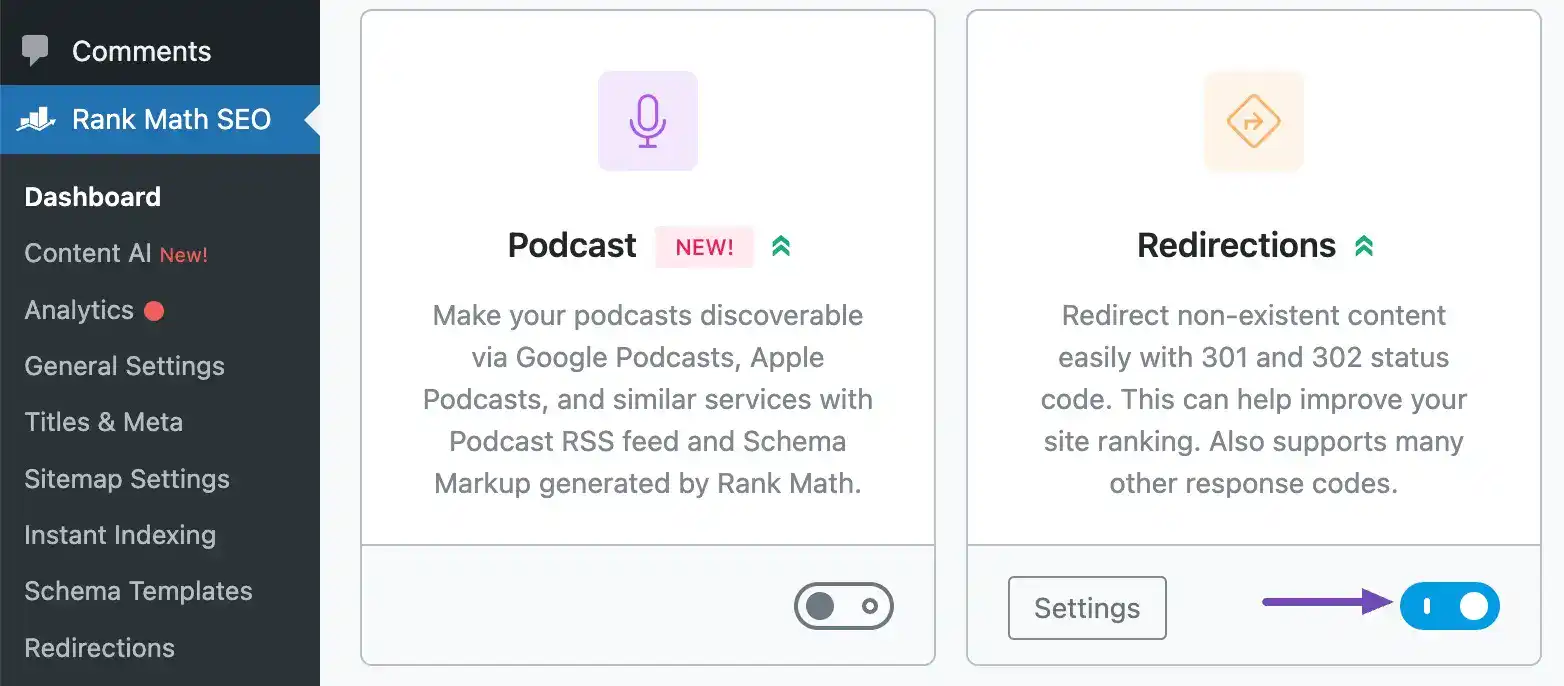
Head on over to Rank Math SEO→ Dashboard in your WordPress admin area in order to confirm that the Redirections module is enabled.
Add a Single Redirect
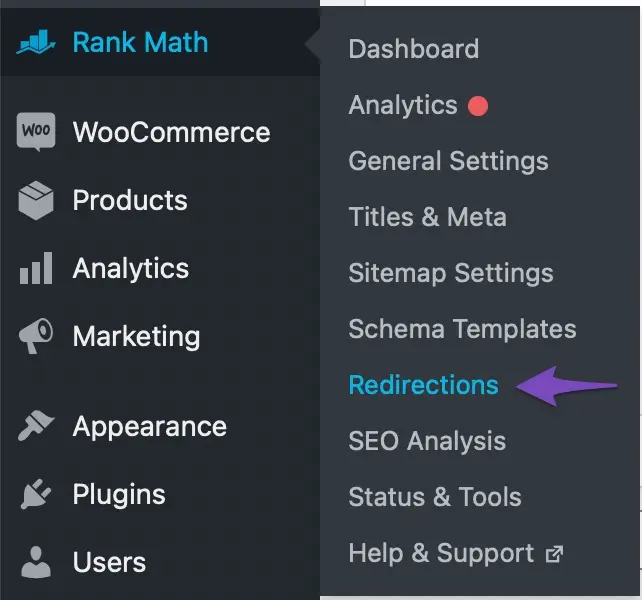
Navigate to Rank Math → Redirections in your WordPress admin dashboard
Create a 301 Redirect
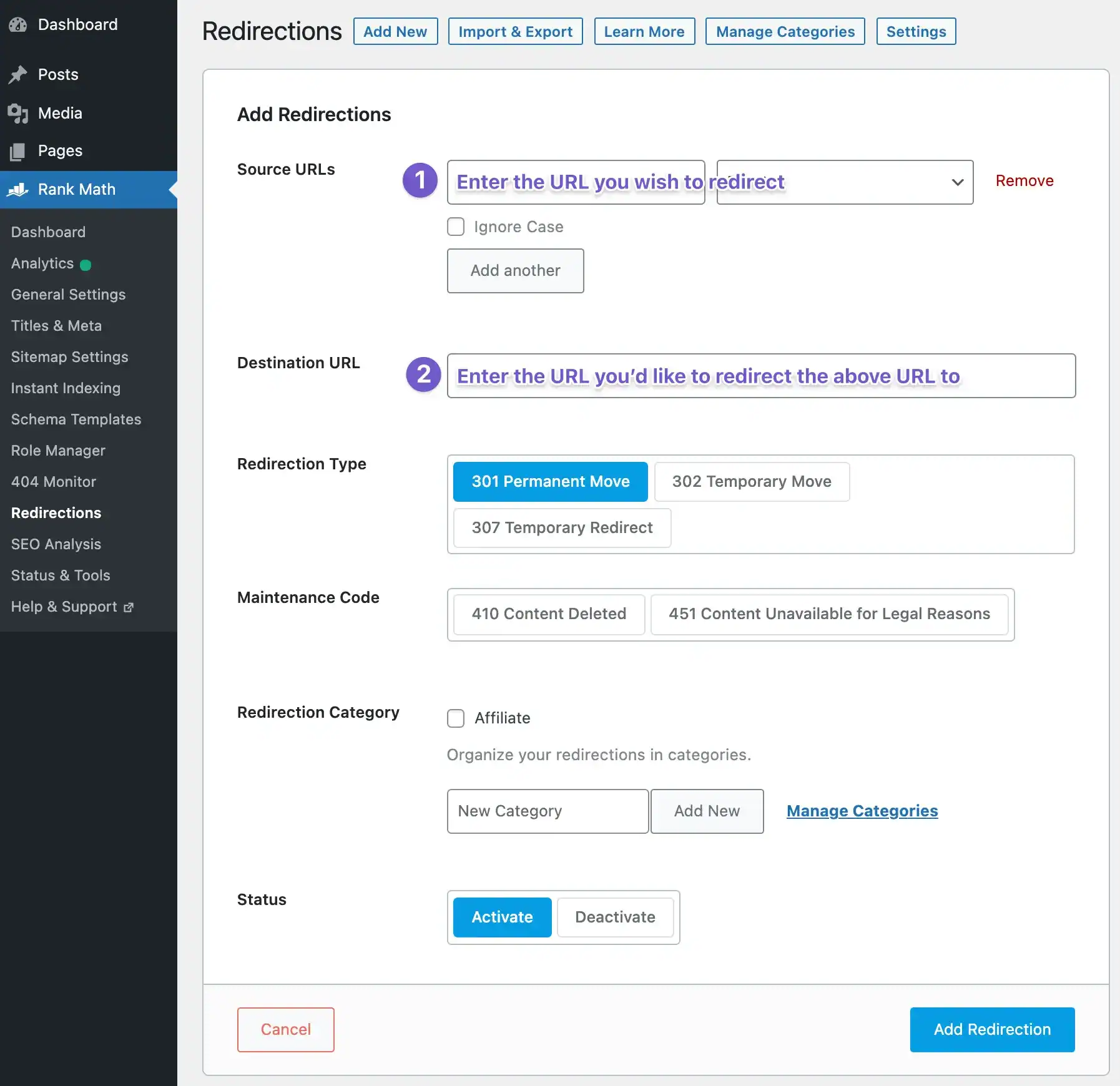
a. Go ahead and create a 301 redirect by simply entering the URL you wish to redirect as your Source URL and the location of the new resource (i.e. where you’d like to redirect the source URL to) as the Destination URL.
b. And once ready to activate, simply click “Add Redirection”.
What Rank Math can do for you?
Unlock your website’s true potential with Rank Math—the ultimate SEO powerhouse! Whether you’re a blogger, entrepreneur, or seasoned webmaster, Rank Math streamlines SEO like never before. Optimize content effortlessly, outrank competitors with advanced analytics, and drive unstoppable traffic to your site. With user-friendly features and powerful tools, Rank Math turns SEO into a breeze, even for beginners. Don’t let your website settle for less—take control and dominate search rankings today!
Install Rank Math now and see the difference for yourself!
Best Practices for 301 Redirects
To ensure effective implementation, follow these proven best practices:
- Plan Ahead
Before implementing 301 redirects, create a detailed migration plan. Conduct a full audit of your existing URLs and match them to their new counterparts. - Use Direct Redirects
Avoid redirect chains, where one URL redirects to another, which then redirects to yet another. Redirect chains dilute link equity and slow down page load times. Aim for a one-to-one mapping:
Old URL -> Final URL - Update Internal Links
Redirects are often used as a quick fix, but don’t stop there. Update all internal links to point directly to the new URL, eliminating unnecessary hops and improving crawl efficiency. - Monitor Post-Implementation
Use tools like Google Search Console, Screaming Frog, or Ahrefs to monitor the effectiveness of your redirects. Check for broken redirects or errors and fix them promptly.
How to Set Up 301 Redirects
Setting up 301 redirects can vary depending on your website’s platform and server configuration. Here’s a step-by-step guide:
- On Apache Servers
For websites hosted on Apache servers, add the following lines to your .htaccess file: Redirect 301 /old-page.html https://www.yourdomain.com/new-page.html - On Nginx Servers
For Nginx servers, include the following rule in your server block configuration: rewrite ^/old-page.html$ https://www.yourdomain.com/new-page.html permanent; - Content Management Systems (CMS)
Most CMS platforms, such as WordPress, Joomla, and Drupal, offer plugins or built-in tools to create 301 redirects without editing server files. For example, in WordPress, you can use the “Redirection” plugin. - Using Hosting Provider Tools
Some hosting providers offer redirect management tools in their control panels. Platforms like cPanel or Cloudflare provide straightforward options for setting up permanent redirects.
301 Redirect vs. 302 Redirect
Understanding the differences between redirect types is essential:
- 301 Redirect (Permanent):
Transfers nearly all the SEO value from the old URL to the new one. Use for permanent changes such as migrations and structural updates. - 302 Redirect (Temporary):
Indicates a temporary change and does not pass full SEO value. Use for A/B testing or short-term changes.
Fixing Broken Links with 301 Redirects
Broken links harm your website by creating a poor user experience and signaling low-quality content to search engines. Use 301 redirects to:
- Redirect broken links to relevant pages.
- Preserve the SEO value of outdated or incorrect URLs.
- Prevent users from encountering frustrating 404 errors.
Tools like Google Search Console and Ahrefs are invaluable for identifying broken links on your site.
Common Mistakes with 301 Redirects
Avoid these common errors when implementing 301 redirects:
- Redirect Loops:
When URL A redirects to URL B, which redirects back to URL A, causing infinite loops. - Generic Redirects to the Homepage:
Redirecting all old URLs to the homepage is unhelpful to users and search engines. Redirects should lead to specific, relevant pages. - Forgetting to Update Sitemaps:
Failing to update your XML sitemap with new URLs can hinder search engine indexing. - Overlooking Analytics Tracking:
Ensure proper tracking is set up to monitor redirected URLs and assess traffic flow.
Redirect Chains and 301 Redirects
Redirect chains occur when a series of redirects is created between multiple URLs. For example:
Old URL -> Intermediate URL -> Final URL
These chains:
- Slow down page load times.
- Confuse search engines.
- Dilute link equity.
To avoid redirect chains, consolidate them into a direct path:
Old URL -> Final URL
Website Migration Tips with 301 Redirects
A successful website migration depends on careful planning and execution. Use these tips to ensure a seamless transition:
- Audit Your URLs:
Use tools like Screaming Frog to generate a list of existing URLs and assess their traffic, backlinks, and SEO value. - Plan the New Structure:
Design a clear and logical URL structure for your new site, ensuring improved SEO and usability. - Test Redirects Before Launch:
Use staging environments to test 301 redirects, ensuring that no links are missed. - Track Metrics Post-Migration:
Monitor traffic, rankings, and crawl behavior after the migration to identify and resolve issues quickly.
How to Create 301 Redirects
Creating 301 redirects involves:
- Identifying URLs:
List all old URLs that need redirection. - Mapping to New URLs:
Match each old URL with the most appropriate new one. - Implementing on the Server or CMS:
Use methods outlined earlier (e.g.,.htaccess, CMS plugins, or hosting tools). - Testing Redirects:
Verify that each redirect works correctly and points to the intended page.
SEO Impact of 301 Redirects
301 redirects are indispensable for preserving and improving SEO during significant website changes. They:
- Prevent loss of organic traffic by transferring ranking signals.
- Help search engines understand your site structure and updates.
- Reduce bounce rates by directing users to relevant content.
However, poorly implemented redirects can have a negative SEO impact, such as reducing crawl efficiency or causing indexation issues.
Importance of 301 Redirects for Ranking
301 redirects are vital for retaining your website’s search engine rankings. By seamlessly transitioning link equity, redirecting traffic effectively, and ensuring indexation of new URLs, they prevent ranking drops during significant changes.
Conclusion
301 redirects are a cornerstone of any website migration or restructuring project. They not only preserve SEO value but also enhance user experience by ensuring a seamless browsing journey.
Whether you’re rebranding, fixing broken links, or merging domains, following best practices for 301 redirects ensures a smooth transition for users and search engines alike. With careful planning and ongoing monitoring, you can leverage 301 redirects to maintain traffic, rankings, and user satisfaction effectively.
Frequently Asked Questions
We are always happy to help, if you can’t find the information you are looking for please don’t hesitate to reach out to us!
For permanent moves, yes. A 301 redirect passes SEO value, whereas a 302 is temporary and doesn’t transfer link equity effectively.
Without 301 redirects, users and search engines encounter broken links, leading to poor user experience and loss of SEO rankings.
Yes! CMS tools like WordPress offer plugins that simplify the process.
Only if they’re misused – such as creating loops or redirect chains. Properly implemented, they preserve or even enhance SEO performance.
Ideally, keep them indefinitely, but ensure they’re active for at least 1-2 years to capture long-term traffic and link equity.
A single 301 redirect has minimal impact on site speed. However, excessive redirect chains (multiple consecutive redirects) can slow down loading times. To ensure optimal performance, use direct redirects whenever possible. For instance, redirect Page A → Page C instead of Page A → Page B → Page C.
A 301 redirect is used to permanently redirect traffic from one URL to another. It’s commonly implemented when:
- A webpage’s URL changes.
- A website migrates to a new domain.
- Duplicate content needs to be consolidated to a single URL.
- Broken links need to be fixed by pointing to an active page.
Did you find this article informative? Share it with your friends!
